
404 & 4xx Error fixing for SEO
Fixing 404 errors and other 4xx status codes is one of the fastest ways to improve technical SEO, user experience, and crawl efficiency. On seocheck.tech I provide professional audits and implementations: 301 redirects, soft 404 cleanup, internal link repair, and Google Search Console-driven prioritization—so search engines and users always reach the right content.
Professional 404 & 4xx Error Resolution for Better SEO
A 404 Not Found response is normal on every website, but uncontrolled 404s (and other 4xx errors) can waste crawl resources, break internal navigation, and interrupt conversions. My service focuses on reducing harmful error patterns while keeping the correct HTTP signals for search engines.
What I Fix (Not Just “Hide”)
- 404 errors caused by broken internal links, outdated URLs, and incorrect routing.
- Soft 404 issues (pages showing “not found” content but returning 200), which often confuses indexing.
- 410 Gone for content that is permanently removed (cleaner indexing signals than a random redirect).
- 401/403 access problems that block important pages (misconfigured protection, WAF rules, staging leaks).
- “Blocked due to other 4xx issue” patterns (often malformed URLs returning 400 or similar).
- 429 Too Many Requests spikes that can slow crawling if rate limiting is implemented too aggressively.
My Process (SEO + Dev-Ready)
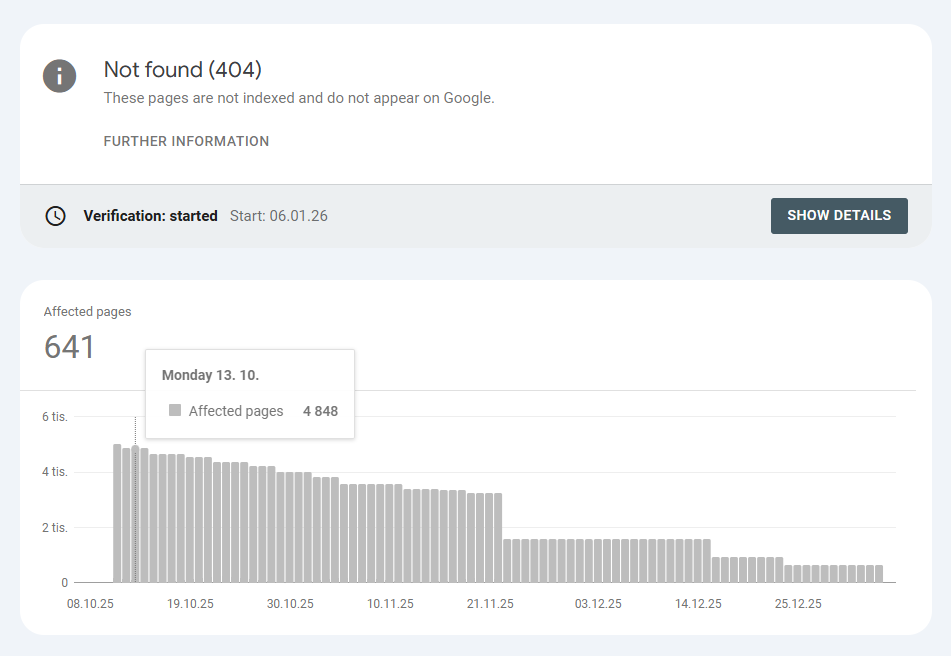
- GSC-based diagnosis: I export affected URLs from Google Search Console and segment by type (404, soft 404, 410, 403, other 4xx), source, and priority.
- Root-cause analysis: internal linking, CMS routing, rewrite rules, trailing slashes, URL parameters, case sensitivity, multilingual paths, pagination, and legacy migrations.
- Correct response strategy:
- 301 only when a true replacement exists (preserve relevance, avoid redirect noise).
- 410 when the page is permanently removed and has no replacement.
- 404 when it’s unknown/temporary or should stay missing (but cleaned from internal references).
- UX-friendly 404 page: clear message, navigation, search, and relevant suggestions to keep users engaged.
- Internal cleanup: fix broken internal links, update menus, breadcrumbs, templates, and canonical logic.
- Sitemap hygiene: remove dead URLs, keep only indexable pages, align with canonical versions.
- Validation: URL inspection spot-checks, server log sanity checks (if available), and “Validate fix” in GSC.
What You Get
- A prioritized list of 404 / 4xx URLs and their sources.
- A redirect map (old → new) for implementation in CMS/.htaccess/Nginx/CDN rules.
- Recommendations for soft 404 prevention and indexability alignment.
- A stronger technical SEO foundation: fewer crawl dead-ends, cleaner internal linking, better UX.
Typical Wins
- Reduced “Not found” noise in Google Search Console and cleaner Page indexing reports.
- Higher conversion continuity thanks to fewer dead ends and a more helpful 404 page.
- Improved site quality signals through consistent HTTP status usage and better internal architecture.
If you want your site to stop leaking traffic through broken URLs and indexing confusion, I’ll turn error reports into a clear, measurable plan—then implement the fixes with SEO and engineering precision.
FAQ: 404 & 4xx Errors
Do 404 errors hurt SEO?
Occasional 404 responses are normal. The real problem is when important URLs, internal links, or high-value backlinks point to missing pages. In that case, you may lose relevance, waste crawl resources, and reduce conversions. The fix is prioritization: repair internal links, redirect only when a true replacement exists, and keep correct status codes where removal is intentional.
When should I use 301 vs 404 vs 410?
Use 301 when a close, relevant replacement exists. Keep 404 when the page is missing and might return or has no suitable replacement. Use 410 when content is permanently removed and should be dropped from indexing faster. Randomly redirecting everything to the homepage is usually a bad signal for both users and crawlers.
What is a soft 404 and why is it dangerous?
A soft 404 happens when the page looks like “not found” but returns 200. This can confuse indexing, waste crawl time, and pollute the index with low-value URLs. The fix is to return the correct HTTP status (404 or 410) and ensure templates don’t output “error content” on a 200 response.
Why does Google Search Console show “Blocked due to other 4xx issue”?
This usually means Google received a 4xx status that isn’t categorized as the common 401/403/404 buckets—often a 400 from malformed URLs, security rules, or incorrect server handling. The solution is to confirm the exact response, remove internal references to those URLs, and fix the routing or firewall behavior if the pages are important.
Should I redirect all 404 URLs to the homepage?
No. Blanket homepage redirects can create relevance loss and user confusion, and may lead to “soft 404” classification. Redirect only when there’s a meaningful, equivalent destination. Otherwise, keep 404/410 and clean up the sources (internal links, sitemaps, templates, external references where possible).
Can you implement the fixes, or only deliver recommendations?
I can do both: deliver a clear action plan and also implement the changes—redirect rules, internal link repairs, sitemap cleanup, and 404 page improvements—depending on your CMS and hosting stack.